
 前往官网


 发布
CIM 摄像头接口模块
模块功能介绍
CIM(camera interface module)模块实现接收前端camera sensor发送的图像信号,支持8bit DVP,MIPI,BT656数据输入,支持YUV422,RGB888,RGB565,MONO(8)等格式输出,支持snapshot功能。
驱动源码位置
驱动源码位于:
module_drivers/drivers/media/platform/ingenic-cim
├──ingenic_camera.c
├──ingenic_camera.h
├──Kconfig
├──Makefile
├──mipi_csi.c
└──mipi_csi.h
设备树配置
设备树所在位置:
kernel内核(version <= 5.10)dts文件路径:
module_drivers/dts-stage/x1600/x1600.dtsi
kernel内核(version > 5.10)dts文件路径:
module_drivers/dts/x1600/x1600.dtsi
CIM控制器描述:
cim: cim@0x13060000 {

 compatible = "ingenic,x1600-cim";

 reg = <0x13060000 0x10000>;

 interrupt-parent = <&core_intc>;

 interrupts = <IRQ_CIM>;

 clocks = <&clock CLK_DIV_CIM>, <&clock CLK_GATE_CIM>, <&clock CLK_GATE_MIPI_CSI>;

 clock-names = "div_cim", "gate_cim", "gate_mipi";

 status = "disable";

};
设备树默认配置
reserved-memory {

 reserved_memory: reserved_mem@0x2000000{

 compatible = "shared-dma-pool";

 reg = <0x02000000 0x2000000>;

 };

 };

&cim{

 status = "okay";

 memory-region=<&reserved_memory>;

};
设备树自定义配置
&cim{

 status = "disable";

 memory-region=<&reserved_memory>;

};
在halley6_v10.dts中,对reseved_memory进行如下自定义配置:
reserved-memory {

 reserved_memory: reserved_mem@0x1800000{

 compatible = "shared-dma-pool";

 reg = <0x01800000 0x800000>;

 };

};
注:x1600 总内存为32M,x1600e 总内存为64M,reseved_memory可设为8M,也可根据camera sensor自定义reseved_memory大小。计算方法如下:
位宽×输出图像宽度×输出图像高度×描述符个数。
CIM控制器配置
在halley6_cameras/RD_X1600_HALLEY6_MIPI_CAMERA.dtsi中,对cim控制器进行如下自定义配置:其中,data-lanes字段根据接入的mipi sensor的data lane数量填充,例如:接入2 lane mipi sensor,data-lanes需填充两个参数,data-lanes = <0 1>,接入4 lane mipi sensor,data-lanes需填充四个参数,data-lanes = <0 1 3 4>;clk-lanes字段根据接入的mipi sensor的clock lane数量填充,例如:mipi sensor 连接一根clk lane,clk-lanes需填充一个参数,clk-lanes = <2>。
&cim {

 status = "okay";

 port {

 cim_0: endpoint@0 {

 remote-endpoint = <&sc031gs_ep0>;

 data-lanes = <0 1>;

 clk-lanes = <2>;

 };

 };

};
在halley6_cameras/RD_X1600_HALLEY6_DVP_CAMERA.dtsi中,对cim控制器进行如下自定义配置
&cim {

 status = "okay";

 port {

 cim_0: endpoint@0 {

 remote-endpoint = <&sc031gs_ep0>;

 bus-width = <8>;

 data-shift = <0>;

 bus-type = <5>;

 hsync-active = <1>;

 vsync-active = <0>;

 data-active = <1>;

 pclk-sample = <1>;

 };

 };

};
camera sensor配置
在halley6_cameras/RD_X1600_HALLEY6_MIPI_CAMERA.dtsi中,对camera sensor进行如下自定义配置:
&i2c0 {

 status = "okay";

 clock-frequency = <100000>;

 timeout = <1000>;

 pinctrl-names = "default";

 pinctrl-0 = <&i2c0_pa>;

 sc031gs_0:sc031gs@0x30 {

 status = "okay";

 compatible = "sc031gs";

 reg = <0x30>;

 pinctrl-names = "default";

 pinctrl-0 = <&cim_mipi_mclk_pc>;

 resetb-gpios = <&gpa 30 GPIO_ACTIVE_LOW INGENIC_GPIO_NOBIAS>;

 vcc-en-gpios = <&gpb 12 GPIO_ACTIVE_HIGH INGENIC_GPIO_NOBIAS>;

 port {

 sc031gs_ep0:endpoint {

 remote-endpoint = <&cim_0>;

 };

 };

 };

};
在halley6_cameras/RD_X1600_HALLEY6_DVP_CAMERA.dtsi中,对camera sensor进行如下自定义配置:
&i2c0 {

 status = "okay";

 clock-frequency = <100000>;

 timeout = <1000>;

 pinctrl-names = "default";

 pinctrl-0 = <&i2c0_pa>;

 sc031gs_0:sc031gs@0x30 {

 status = "okay";

 compatible = "sc031gs";

 reg = <0x30>;

 pinctrl-names = "default";

 pinctrl-0 = <&cim_mipi_mclk_pc>, <&cim_pa>;

 resetb-gpios = <&gpa 30 GPIO_ACTIVE_HIGH INGENIC_GPIO_NOBIAS>;

 vcc-en-gpios = <&gpb 12 GPIO_ACTIVE_LOW INGENIC_GPIO_NOBIAS>;

 port {

 sc031gs_ep0:endpoint {

 remote-endpoint = <&cim_0>;

 };

 };

 };

};
内核编译配置
内核配置,配置说明如下:
Symbol: VIDEO_INGENIC_CIM [=y]

Type : tristate

Prompt: Ingenic Soc Camera Driver for X2000 && M300 && X1600

 Location:

 -> Ingenic device-drivers Configurations

 -> [CIM] Drivers

Defined at module_drivers/drivers/media/platform/ingenic-cim/Kconfig
内核默认编译配置
设备树默认编译会产生CIM控制器设备。
内核自定义编译配置
CIM接口配置说明
DVP接口
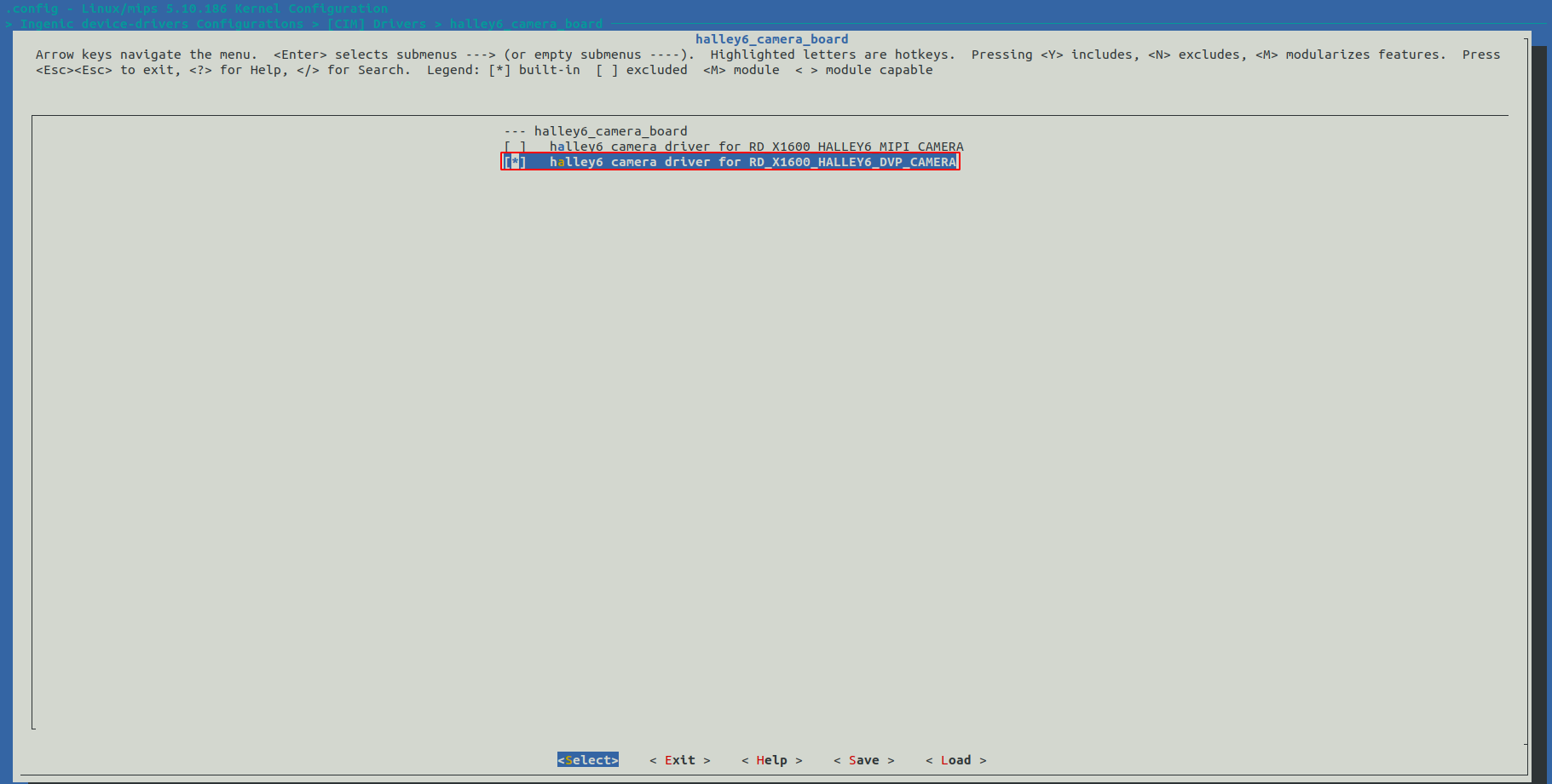
Symbol: RD_X1600_HALLEY6_DVP_CAMERA [=y]
Type  : bool
Defined at module_drivers/drivers/media/platform/ingenic-cim/Kconfig:97
Prompt: halley6 camera driver for RD_X1600_HALLEY6_DVP_CAMERA
Depends on: (SOC_X2000_V12 || SOC_X2000 [=n] || SOC_M300 [=n] || SOC_X1600 [=y] || SOC_X2100 [=n] || SOC_X2600 [=n]) && HALLEY6_CAMERA_BOARD [=y]
Location:
-> Ingenic device-drivers Configurations
-> [CIM] Drivers
-> Ingenic Soc Camera Driver for X2000 && M300 && X1600 && X2600 (VIDEO_INGENIC_CIM [=y])
-> halley6_camera_board (HALLEY6_CAMERA_BOARD [=y])
Selects: INGENIC_CIM_CAMERA_SC031GS [=y]
CONFIG_INGENIC_CIM_CAMERA_SC031GS:
This is a ingenic-cim camera driver for the OmniVision SC031GS sensor DVP interface
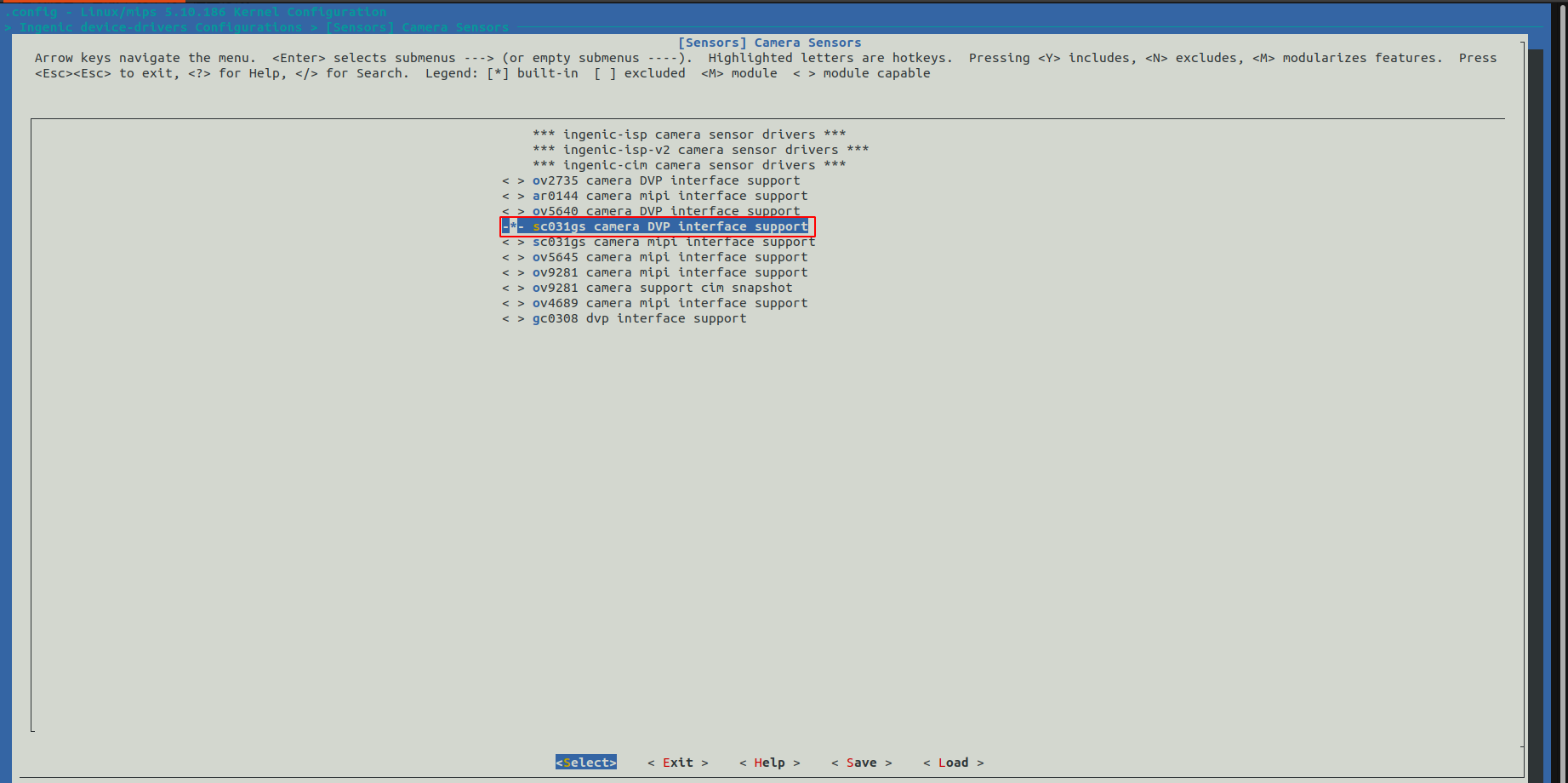
Symbol: INGENIC_CIM_CAMERA_SC031GS [=y]
Type  : tristate
Defined at module_drivers/drivers/media/i2c/ingenic-cim/Kconfig:21
Prompt: sc031gs camera DVP interface support
Depends on: VIDEO_INGENIC_CIM [=y] && I2C [=y]
Location:
-> Ingenic device-drivers Configurations
-> [Sensors] Camera Sensors
Selected by [n]:
- RD_X1600_PANDA_DVP_CAMERA_1V0 [=n] && (SOC_X2000_V12 || SOC_X2000 [=n] || SOC_M300 [=n] || SOC_X1600 [=y] || SOC_X2100 [=n] || SOC_X2600 [=n]) && PANDA_CAMERA_BOARD [=n]
- RD_X1600_HALLEY6_DVP_CAMERA [=n] && (SOC_X2000_V12 || SOC_X2000 [=n] || SOC_M300 [=n] || SOC_X1600 [=y] || SOC_X2100 [=n] || SOC_X2600 [=n]) && HALLEY6_CAMERA_BOARD [=y]
DVP_CAMERA配置界面如下:
MIPI接口
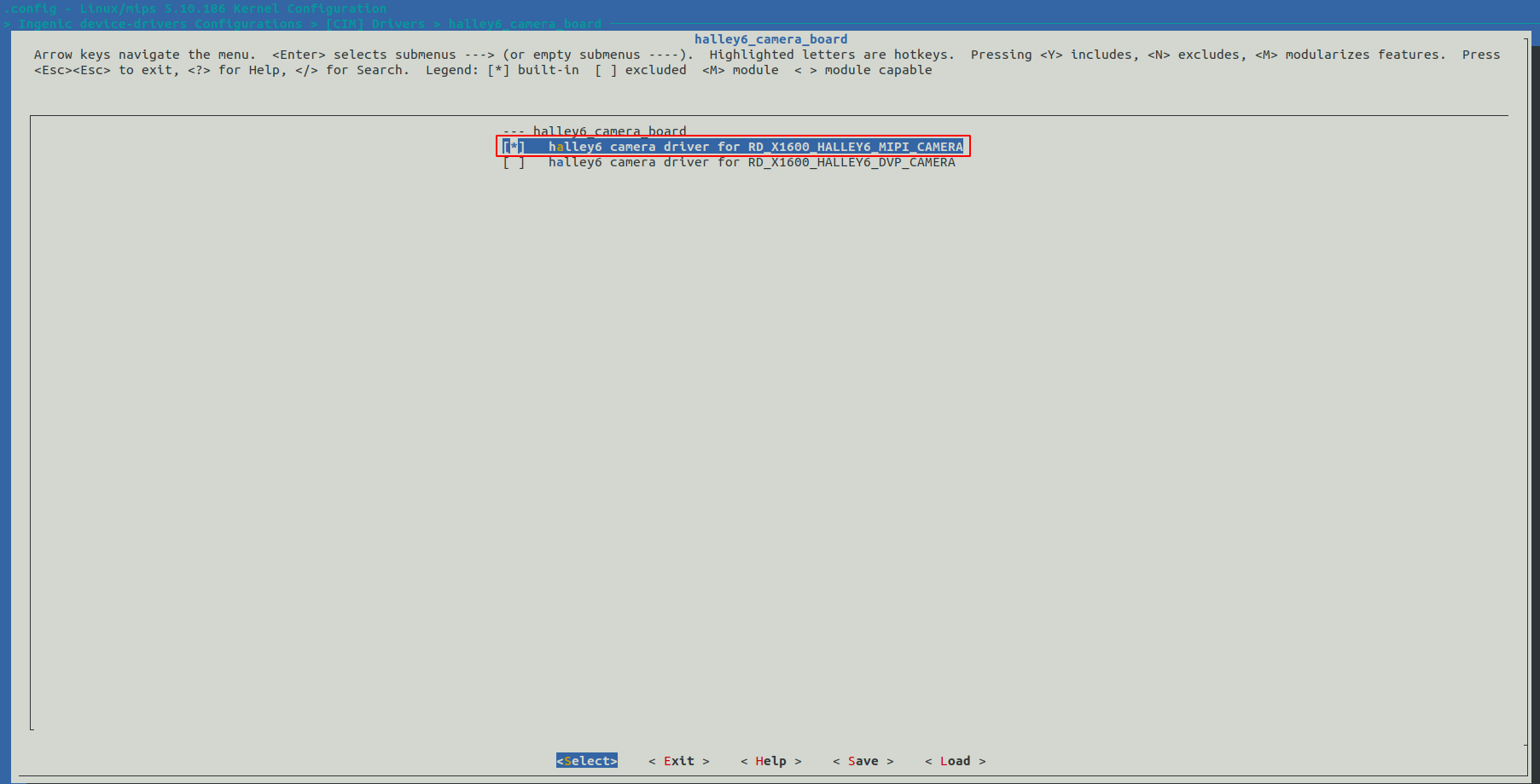
Symbol: RD_X1600_HALLEY6_MIPI_CAMERA [=n]
Type  : bool
Defined at module_drivers/drivers/media/platform/ingenic-cim/Kconfig:92
Prompt: halley6 camera driver for RD_X1600_HALLEY6_MIPI_CAMERA
Depends on: (SOC_X2000_V12 || SOC_X2000 [=n] || SOC_M300 [=n] || SOC_X1600 [=y] || SOC_X2100 [=n] || SOC_X2600 [=n]) && HALLEY6_CAMERA_BOARD [=y]
Location:
-> Ingenic device-drivers Configurations
-> [CIM] Drivers
-> Ingenic Soc Camera Driver for X2000 && M300 && X1600 && X2600 (VIDEO_INGENIC_CIM [=y])
-> halley6_camera_board (HALLEY6_CAMERA_BOARD [=y])
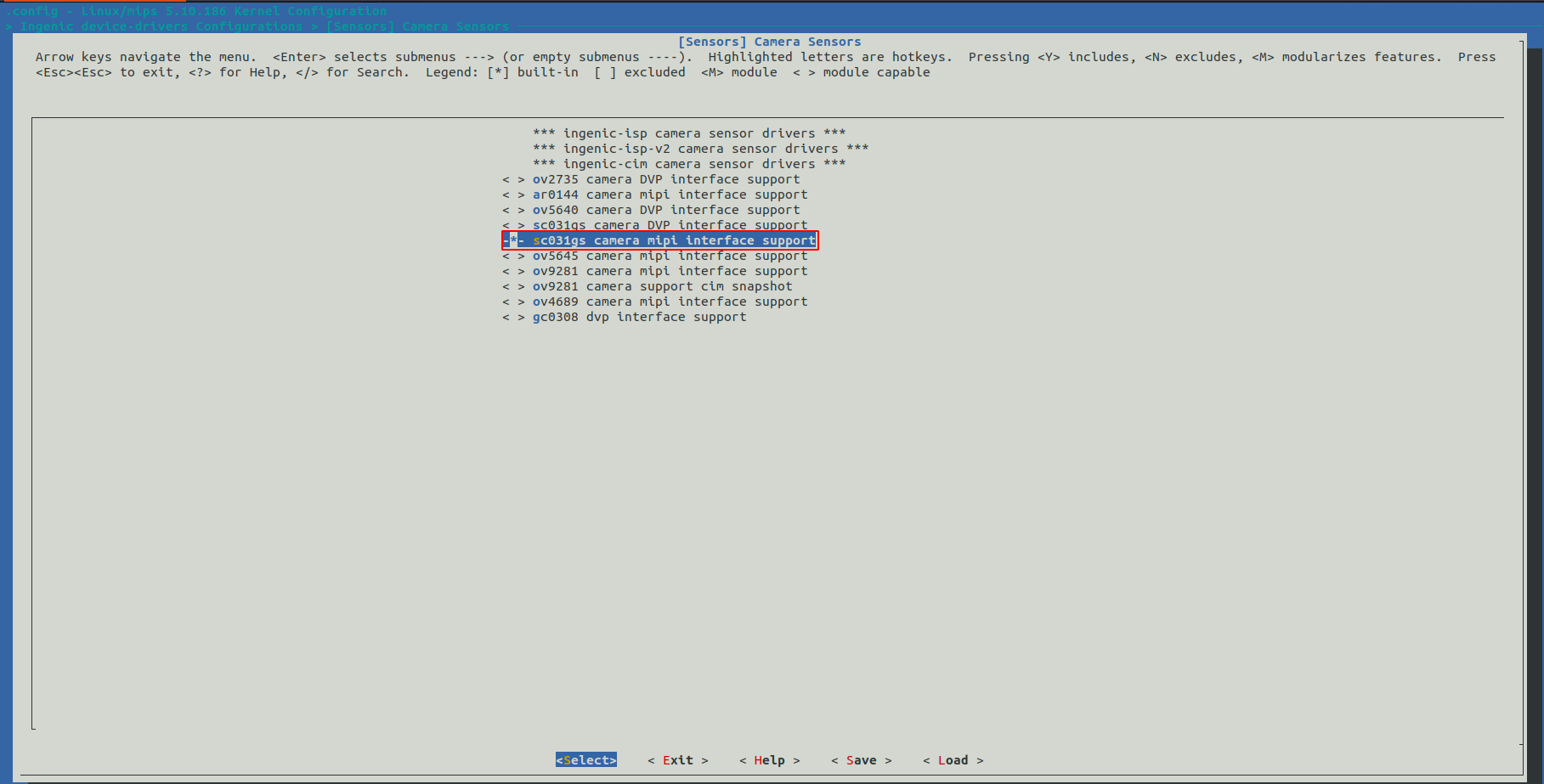
Selects: INGENIC_CIM_CAMERA_MIPI_SC031GS [=n]
Symbol: RD_X1600_HALLEY6_MIPI_CAMERA [=y]
Type  : bool
Defined at module_drivers/drivers/media/platform/ingenic-cim/Kconfig:92
Prompt: halley6 camera driver for RD_X1600_HALLEY6_MIPI_CAMERA
Depends on: (SOC_X2000_V12 || SOC_X2000 [=n] || SOC_M300 [=n] || SOC_X1600 [=y] || SOC_X2100 [=n] || SOC_X2600 [=n]) && HALLEY6_CAMERA_BOARD [=y]
Location:
-> Ingenic device-drivers Configurations
-> [CIM] Drivers
-> Ingenic Soc Camera Driver for X2000 && M300 && X1600 && X2600 (VIDEO_INGENIC_CIM [=y])
-> halley6_camera_board (HALLEY6_CAMERA_BOARD [=y])
Selects: INGENIC_CIM_CAMERA_MIPI_SC031GS [=n]
MIPI_CAMERA配置界面如下:
注意事项
MIPI和DVP接口不能同时配置使用。
使用snapshot功能时打开Sensor support snapshot function,并配置脉冲宽度和delay时间,在sensor驱动中将sensor配置为sanpshot模式。
内核差异
设备节点生成
驱动加载成功后生成以下节点:
/dev/video11
cim的输出节点。
应用程序使用说明
cimutils
源码位置
packages/example/cimutils/
命令行及参数示意
# cimutils -C -I dev/video11 -x 640 -y 480 -t grey -f test.raw
-x 指定图像宽度;
-y 指定图像高度;
-v 指定cim控制器;
-t 指定图像格式;
-f 指定图像文件名。
v4l2-ctl
源码位置
buildroot/dl/libv4l/v4l-utils-1.24.1.tar.bz2
命令行及参数示意
# v4l2-ctl –v width=640,height=480,pixelformat="GREY" --stream-mmap=3 --stream-to="cim-test.yuv" –d /dev/video11
width指定输出图像宽度;
heigh 指定输出图像高度;
pixelformat指定输出图像格式;
--stream-mmap指定轮转buffer数量;
--stream-to指定储存图像文件名;
-d指定图像输出的video节点